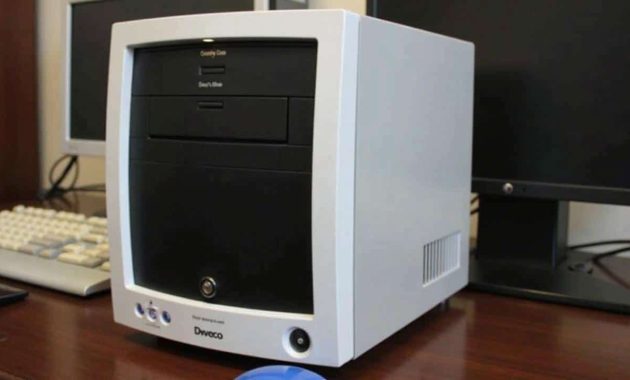
On the folding table at the neighborhood flea market, the beige tower looked like a fossil from another era. Yellowed plastic, a sticker from a long-gone ISP, and a handwritten tag: “Old PC – 15 € – works (I think)”. People walked past without even slowing down. Who would bother with that when new laptops are flashing discounts in every ad?
But Thomas stopped. He was 24, broke, and tired of sharing his student laptop with a fan louder than a hair dryer. Fifteen euros was two fast-food menus or one shot at having a real desktop at home. He hesitated, asked the seller to plug it in. A small green light blinked. The fans spun. That was enough. He paid, carried the heavy case home like a half-joke, half-bet with himself.
That evening, when he pressed the power button and saw what was inside, the joke suddenly changed scale.
From dusty junk to small powerhouse
When Thomas opened the case, he expected a mess of cobwebs and outdated parts. Instead he found a surprisingly clean machine: a mid-range processor from a few years ago, enough RAM for modern tasks, a graphics card far from high-end but still decent. Nothing shiny, just components that quietly held their ground. The kind of PC someone once built carefully, then forgot in a corner of an office.
The real surprise came when he connected it to his screen. The system booted quickly, not crawling like those infamous old family PCs loaded with toolbars. The previous owner had left a clean install of a recent operating system, a few basic apps, nothing malicious. Internet worked. YouTube in HD, office tools, light photo editing, a bit of indie gaming: everything ran smoother than on his exhausted laptop. For 15 €, he had basically upgraded his digital daily life without planning it.
Behind this small story hides a simple reality: a lot of second-hand PCs are massively underestimated. People see the old plastic case and assume the inside is from the Stone Age. Yet many office machines or custom builds from 5–7 years ago are still perfectly capable for everyday tasks today. The gap between “obsolete for AAA gaming” and “useless for normal life” is huge. A used machine can be bad for ultra-demanding games and still brilliant for browsing, work, video, and a bit of creativity.
How to spot a hidden gem for the price of a pizza
There’s a method behind the miracle. Thomas didn’t just buy the first dusty box he saw. He asked two questions: does it turn on, and what’s inside? Even in a flea market, you can request to plug the tower in, check if the fans spin, if a light appears. You won’t know everything, but you filter out total corpses. Then, you look for model stickers or brand references you can quickly search on your phone. Just typing the processor name plus “benchmark” or “release year” can tell you a lot.
Online, the approach is the same. You read the ad, ignore vague lines like “very powerful” or “works great for me”. What matters: processor model, RAM amount, storage type (HDD or SSD), graphics card. If one of these is missing, you ask. If the seller refuses to say, you pass. It sounds picky for a cheap PC, yet those two minutes of checking can be the difference between a slow frustration machine and a small revelation on your desk. *A fifteen-euro ticket to comfort is still a ticket — you don’t toss it blindly.*
The trap many people fall into is judging only by age or looks. A scratched case doesn’t mean a slow PC. A “new” low-cost office machine with a weak processor can be worse than a slightly older mid-range model. Let’s be honest: nobody really compares specs for hours before buying a bargain. We see a price, we decide fast, we regret later. The plain truth is that a quick glance at three numbers can save you. RAM above 8 GB, SSD instead of mechanical hard drive, and a processor no older than, say, 2015: that’s often enough to transform a “why not” buy into a daily workhorse.
Upgrading without blowing the budget
Once the surprise of the good deal passed, Thomas did one smart thing. He didn’t rush to replace everything. He started by cleaning. A bit of compressed air, wiping off the dust filters, checking the cables were firmly seated. Then he made the smallest, most impactful upgrade: adding a used SSD he found for a few euros online. Cloned the system, moved it over, rebooted. Boot time was suddenly sliced in half, apps launched almost instantly. For under 30 € total, he had a setup that honestly felt new in daily use.
➡️ Prince William pays tribute to emergency responders after a national tragedy: “Your courage defines this country”
➡️ Scientists Are Tracking Mysterious Blackouts Beneath the Sea
➡️ “No one explained how to do it”: their firewood stored for months was actually unusable
➡️ Kate Middleton makes a highly anticipated public return after her cancer announcement, choosing a symbolic outfit that sends a quiet but powerful message
➡️ Scientists warn that an unprecedented snow system could overwhelm emergency services, leaving entire regions isolated and critical infrastructure at risk
➡️ You would die in space in 15 seconds:You would die in space in 15 seconds.
➡️ Major Chinese discovery for humanity : a plant that may be the only known species able to extract and concentrate rare earths from soil
➡️ The United States is betting on a drone that could change aircraft carriers’ lives: this unmanned tanker has already cleared the most underrated step, taxiing, and is preparing the shift to far greater range
That’s usually the best path with any second-hand PC that isn’t completely outdated. Instead of dreaming of changing the processor, motherboard, graphics card all at once, you start with what changes your life: an SSD if there isn’t one already, a bit more RAM if it’s under 8 GB, maybe a quieter fan. Many people throw away machines that are “too slow” when they’re mostly just strangled by an old hard drive and years of digital clutter. The right approach is rarely to replace everything; it’s to unlock what’s already there.
Sometimes the most striking tech upgrade is not buying something new, but finally revealing what an “old” machine can actually do when you treat it with a little respect.
- Add or switch to an SSD – Even a small-capacity one for the system turns a sluggish PC into something you actually enjoy using.
- Increase RAM to at least 8 GB – Below that, modern browsers and apps start to feel sticky and frustrating.
- Clean the interior and fans — Dust acts like a blanket, raising temperatures, reducing performance, and shortening lifespan.
- Reinstall a fresh, legal operating system — Wipes years of junk, malware, and strange tweaks from previous owners.
- *Check power supply and cables* — A stable, healthy power source keeps your “bargain” from turning into a random shutdown nightmare.
When a 15 € PC changes how you see tech
What sticks with Thomas isn’t just the good deal. It’s the slight vertigo of realizing that a machine abandoned on a market table still had years of usefulness in it. That this almost-trash tower now lets him study, work on side projects, play a few games with friends, and even learn a bit of video editing. For a lot of people, that kind of tool is out of reach at retail prices. A forgotten computer in someone’s attic can genuinely change another person’s daily life.
We’ve all been there, that moment when a device slows down and we start dreaming of the new model advertised everywhere. Yet stories like this one raise a quiet question: how many of our “obsolete” machines are just victims of impatience, dust, and marketing? A used PC won’t suit every need, won’t rival the latest gaming beast, won’t impress anyone on a café table. Still, in real life, where budgets are tight and needs are often modest, that 15 € tower reminds us of something simple and slightly uncomfortable: the line between junk and opportunity is often drawn by how curious we’re willing to be.
| Key point | Detail | Value for the reader |
|---|---|---|
| Check the core specs | Processor model, RAM, SSD vs HDD, graphics card | Avoids paying even 15 € for a machine that will feel unusable |
| Start with small upgrades | SSD, RAM, basic cleaning and fresh OS | Transforms a “meh” second-hand PC into a fast everyday tool |
| Look beyond the case | Age and looks often hide surprisingly capable components | Opens the door to serious bargains and less electronic waste |
FAQ:
- Is a 15 € used PC really worth it?Yes, if the core components are still decent. For office work, browsing, streaming, and light gaming, a 5–8-year-old mid-range PC can be more than enough once cleaned and upgraded with an SSD.
- What minimum specs should I look for in a cheap used desktop?At least a dual- or quad-core processor from 2015 or newer, 8 GB of RAM, and ideally an SSD. A separate graphics card is a bonus if you plan to game or edit videos.
- Isn’t buying old PCs risky for security?You reduce the risk by wiping the drive, performing a clean install of a supported operating system, and updating all software and drivers right away.
- Can a second-hand PC handle gaming?Yes, for older or less demanding titles and e-sports games. For the latest AAA games at high settings, you’ll need a stronger graphics card than most ultra-cheap machines have.
- Where to find these kinds of bargains?Local flea markets, classifieds sites, recycling centers that resell, refurbished corporate PC sellers, and even office clear-outs or school upgrades can hide excellent deals.